
In today’s world where applications and all the on-premise systems are moving towards the public cloud, Tagging the respective resources becomes an imperative and integral component for any public cloud in terms of management. This is applicable for public cloud Azure, AWS, Google.. etc.. Here Let’s concentrate on Azure tagging best practices, But not limited to Azure alone.
What are Tags and its benefits?
Tags are nothing but labels for any resource it contains key and value, it has to be unique and does have its own limitations., each public cloud has its own advantages and its limitations. Tags are mainly used for managing and segregating the resources.
Thumb Rules
-
- Consider a proper naming nomenclature, follow the reference architecture if it’s available
- Set minimum 5 tags and make it mandatory [examples: BusinessUnit, Environment, Application, Owner, CostCenter]
- Consider use cases for tagging
- Automate or make a process
Tag Names or Tagging Nomenclature
This is the most important yet missed consideration when we talk about Azure tagging. A proper tagging nomenclature makes your work easier, what this means is you don’t want to redo or repeat the work later. Lets see with an example. Assume an Azure environment having a tag called “BusinessUnit”, Any resources which are getting created need to have this tag assigned is the criteria. Since Azure tags are unique, the tag name misspell is considered as another tag. i.e. “BusinessUnit” or “Business Unit” both sound the same but eventually they are different. The nomenclature to follow is “BusinessUnit” but by entering a new tag name as “Business Unit” now Azure environment has 2 types of tag name for “BusinessUnit”. This becomes harder and even sometimes has business cost implications. Adding fuel to fire, the future resources which are going to be tagged will have 2 options to select under the “BusinessUnit” tag name. This becomes a repetitive or harder task to solve for the Azure Administrators.
So follow a proper naming context with utmost attention. the golden word is Discipline.
How Many Tags?
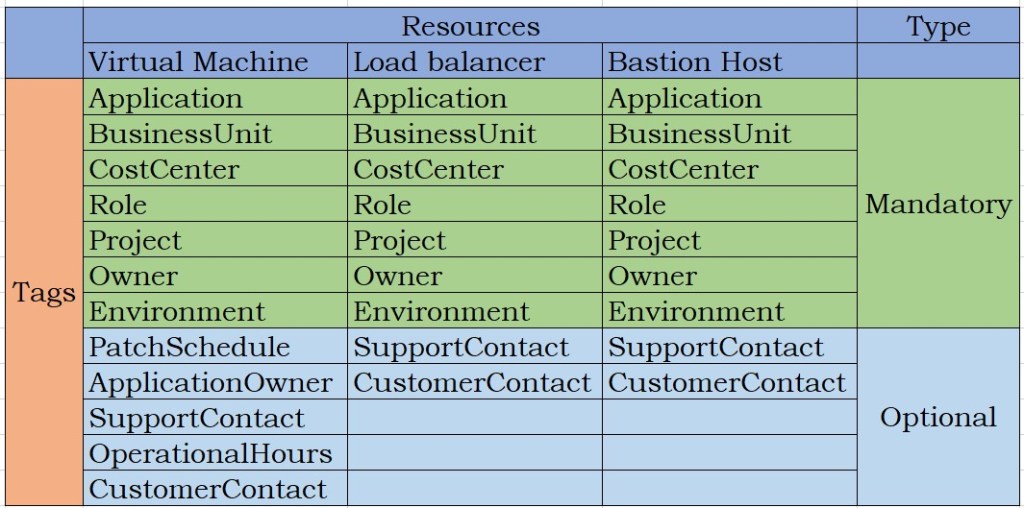
When architecting the tagging solution or during the workshop this is another important consideration. As a best practice always create a reference architecture or document for the tagging with customer acceptance. Always have mandatory tags and optional tags based on resources. Enforce mandatory tags as a process or through automation.
Example table below will give you a general idea on how to segregate the tags based on the needs. Of Course i have limited the tags in the below table for the ideology.
Use cases
Tags can be used wisely and more efficiently if we start considering use cases. Use Cases reflect only the way you want to segregate the resources. Below are some of the use cases. I am not limiting the use case here, in fact we can go with “n” number of use cases or the way we really want to segregate the resources.
-
- Tagging resource groups identifies each resource group belonging to which Business Unit and what they are for..
- Tagging servers for patching makes the server maintenance easier, you can extract the list of servers which needs to be patched on which cycle?
- Tagging the automation runbooks makes the automation work easier in identifying for which automation
- Tagging with support tag gives easier operations easier, this is enable a quick identification as to which support group to be reached thus saving time
- Tagging for Applications and Application Owners for IaaS, PaaS and SaaS gives the operation team edge to reach the respective owners during maintenance
- Tagging for Cost Optimizations, Most important of all. Calculating the costs for each resources
Automate or Make a process
There is a lot of debate in this, however I stand strongly to automate the process of tagging. Enforcing tags through Azure policy may work out for small customers but for larger customers this becomes more cumbersome. A very good process or an Automation will solve most of the issues with respect to Tagging.
ARM template with tags can used for a repetitive service like VM creation etc and this will make the work easier, Also creating an ARM template for each services with tags is also not practical !!
My theory or Solution: Create an Azure Audit policy for the list of the mandatory tags. Create a process or automation which runs on a daily basis to extract the list of the resources which were created that day to check the missing mandatory tags, Integrate the automation with Azure Alerting and ITSM feature to send a mail to the resource creator or create a ticket to the operations queue. This way the tags will always be compliant and bound by SLA, optionally the audit policy compliance report will enable good governance throughout the environment for Azure tagging best practice.
Share your comments..
 BHAVISHYA MAARG
Leave a Reply